

Updates and permissions on one screen
Bulk CSV registration, edit rights reserved for administrators and per-group visibility keep updates and access in order.
+Phonebook Cloud
Contacts updated by an administrator are shared securely to every device. Combined with AGEphone Cloud, the caller's name pops up on incoming calls, so you can check who it is before you answer.
Common problems
A spreadsheet for each department, personal smartphones, business cards left on desks. The more places contact details live, the more updates get missed and the greater the risk of information leaving the company.

How +Phonebook Cloud works
With one place for the information and one owner for updates, there is less work for administrators and users alike.
New contacts and organizational changes can be applied in one go from the web console or a CSV file.
Set who can see each contact: only its owner, a department, the whole company, and so on.
Across multiple sites and devices, users always see the latest contacts.
No readable phonebook data is left on the device. The app looks up information in the cloud when it is needed.
AGEphone Cloud × +Phonebook Cloud
Link +Phonebook Cloud contacts with AGEphone Cloud. When a call comes in, the caller's registered name pops up, so you can confirm who it is before answering.
Note: AGEphone Cloud and +Phonebook Cloud each require a separate subscription.
See AGEphone CloudIncoming call
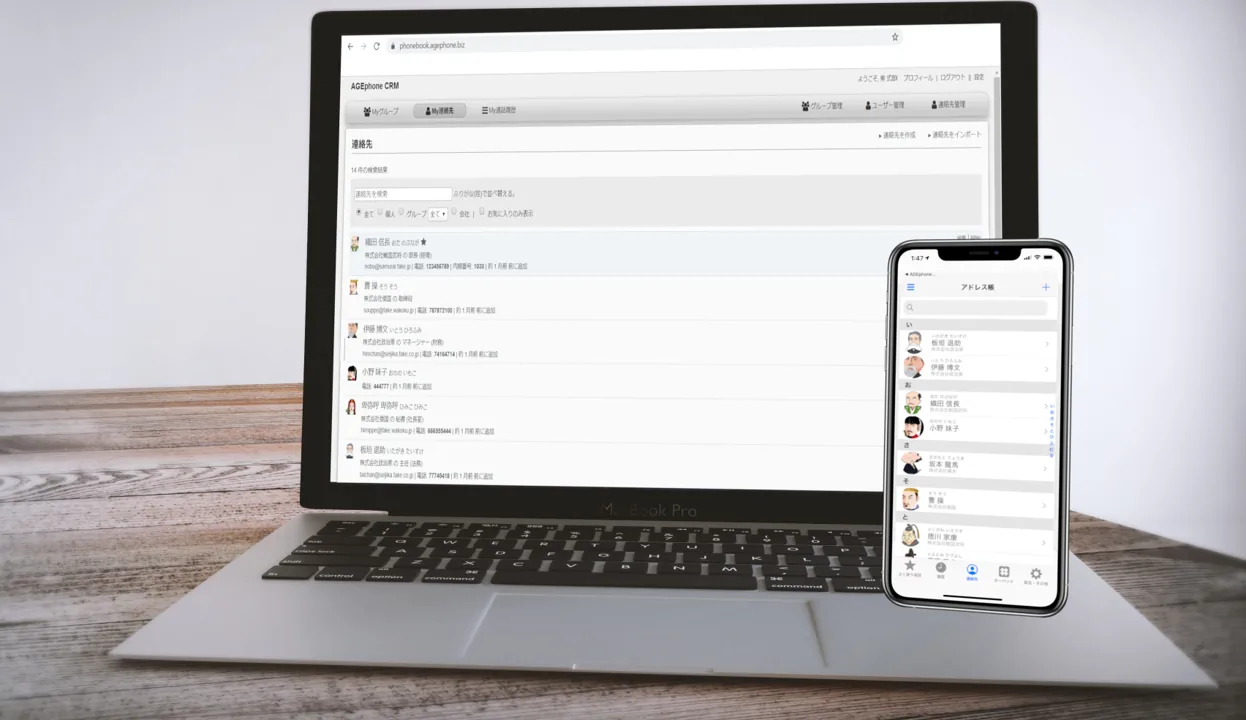
Sample Trading Co., Ltd. Taro Yamada, Sales Dept. 050-XXXX-1234The actual web console and smartphone app
Sync in action
Entries added or edited in AGEphone CRM on a PC are reflected in the +Phonebook Cloud app. The video shows the console and the app syncing, as it actually happens.
Administration and security

Bulk CSV registration, edit rights reserved for administrators and per-group visibility keep updates and access in order.
PIN codes, a reset after five failed attempts, PIN change reminders and remote account suspension.
Work contacts are not saved to the device's built-in contacts, reducing the risk of personal and business information getting mixed.
Benefits

No more correcting several lists for every joiner, leaver or reorganization.
Per-company filters, favorites and contact filters are available.
Linked with AGEphone Cloud, the caller's name can pop up on incoming calls.
Work contacts are handled separately even on personal devices, keeping work and personal data apart.
Compatibility
Also works with the "unit option" for the αZXII from NTT East and NTT West.
Main features
Grouped by who manages, who uses, and which products connect.
Each app requires its own subscription.
System requirements & downloads
For the latest OS support, also check each store listing and the manual.
Windows
Supported OS: Windows 10–11
Ask about the Windows versioniPhone
Core functions verified on iOS 26
Android
Supported OS: Android 12–16
FAQ
Contacts and users can be registered in bulk from CSV files. Sample CSV files are listed under Related documents on this page.
You can register contacts that only their owner can see, as well as contacts shared only within a group you specify.
In addition to PIN protection, the account can be suspended remotely. No readable phonebook data is left on the device.
Yes. Incoming calls to AGEphone Cloud are matched against the contacts registered in +Phonebook Cloud and the caller's name pops up, so you can see who is calling before you answer.
Each AGEphone app you link requires its own subscription. We will advise you after checking your environment.
We advise based on the number of users and your setup. Feel free to contact us even if you have not yet decided how to manage your phonebook.
Talk to us
It's fine if the number of users or sites isn't settled yet. Starting from how you manage contacts now, we'll suggest a suitable way to deploy.
Interested in becoming a reseller? (Japanese)